

Description
Download iSpQ VideoChat – Secure Global Video Chat App
Overview – What is iSpQ VideoChat?
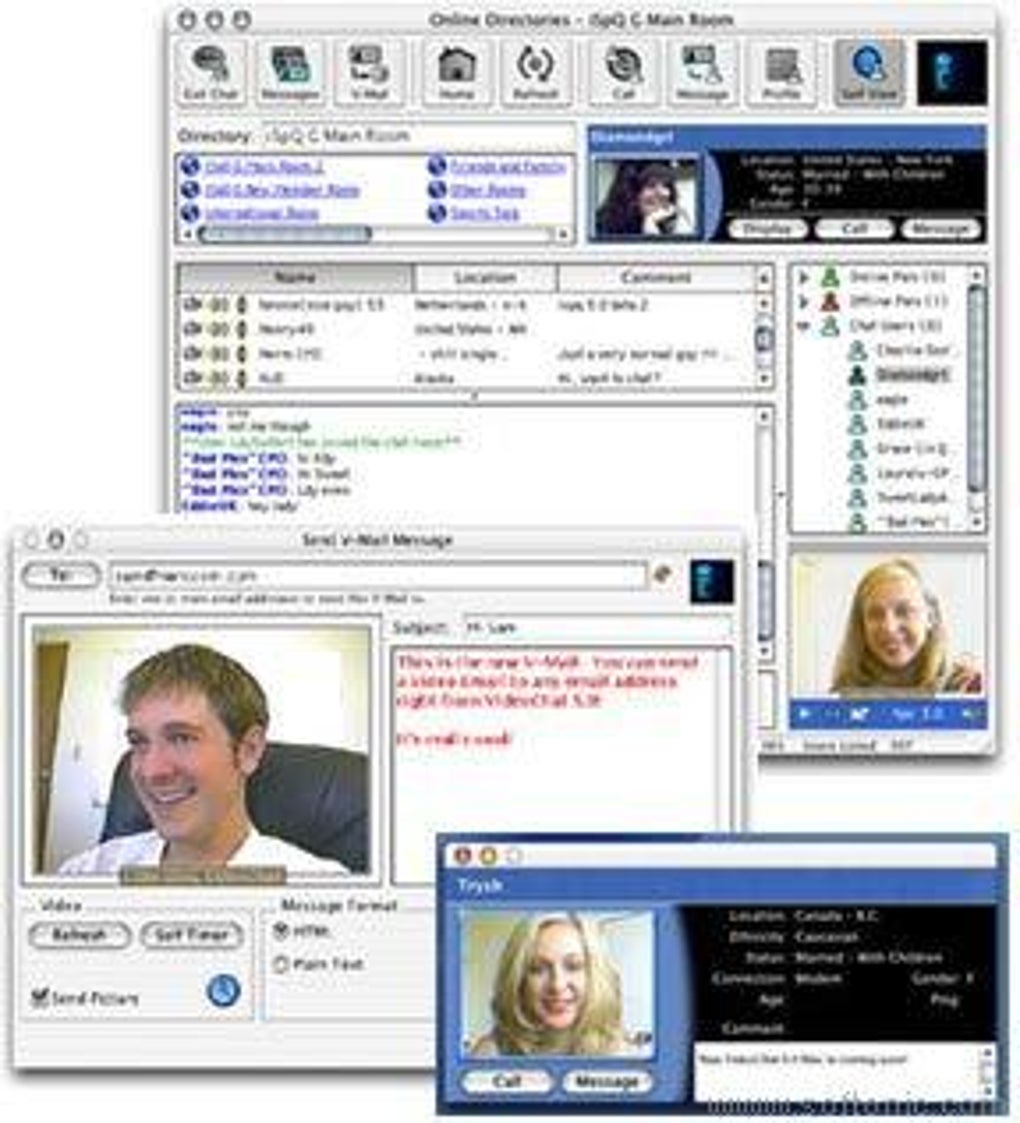
iSpQ VideoChat is a desktop‑focused video‑conferencing tool that puts social connection at its core. Unlike typical business‑oriented platforms, iSpQ is built for people who want to meet strangers from across the globe, chat about daily life, share cultures, and simply enjoy real‑time face‑to‑face conversation. The software hosts hundreds of public directories, private chat rooms, and a searchable contact list, allowing users to wander through themed rooms or target specific regions. While the platform offers a free tier, many of the deeper social features—such as viewing detailed profiles and sending private invitations—require a paid subscription. This model has sparked debate: some see it as a modest barrier that keeps the community safe and reduces spam, while others feel the premium wall limits spontaneous interaction. Technically, iSpQ VideoChat supports high‑resolution video streams, an elegant interface, and quick room switching, making it a viable alternative to mainstream services when the goal is purely social. Whether you’re a digital nomad craving a coffee‑shop‑style chat, a language learner looking for native speakers, or simply someone curious about the world, iSpQ VideoChat offers a niche that blends the immediacy of video with the serendipity of meeting new people online.
Key Features of iSpQ VideoChat
- Global Public Directories: Browse dozens of themed rooms ranging from “Travel Talk” to “Music Lovers,” each populated by users from different continents.
- Private Chat Rooms: Create invitation‑only rooms for friends, study groups, or hobby clubs, with optional password protection.
- High‑Resolution Video: Supports up to 1080p HD streams on compatible hardware, ensuring clear and crisp visuals.
- Profile Previews (Premium): Paid members can view detailed user profiles, photos, and language tags before initiating a conversation.
- Instant Room Switching: Seamlessly hop between rooms without ending the current call, perfect for exploring multiple interests in one session.
- Cross‑Platform Support: Available for Windows, macOS, Android, and iOS, allowing you to stay connected on desktop or mobile.
- Secure Connection: End‑to‑end encryption for video and audio streams, safeguarding your conversation from eavesdropping.
- Moderation Tools: Built‑in reporting and mute functions help keep rooms friendly and free from harassment.
- Customizable Avatars: Choose a virtual avatar or upload a personal photo to personalize your on‑screen presence.
- Free Tier with Upgrade Path: Basic video chat is free; a modest subscription unlocks advanced social features.
Installation, Setup, and Daily Usage
Getting started with iSpQ VideoChat is straightforward. First, visit the official website and click the Download button that matches your operating system. The installer size is under 150 MB, making it quick to download even on slower connections. After the download completes, run the installer and follow the on‑screen prompts: accept the license agreement, choose an installation folder (the default works for most users), and click Finish. The app will launch automatically, presenting a clean login screen.
New users can create a free account using an email address or a social login (Google or Facebook). After verifying the email, you’ll be taken to the dashboard where the global directory list appears on the left side of the window. To join a room, simply click its name; a preview window shows the current participants and a short description. Press the Enter Room button, grant camera and microphone permissions, and you’re live. The interface includes a small toolbar for muting, video toggling, and a “raise hand” feature that signals the room host.
Compatibility: iSpQ VideoChat runs on Windows 10/11 (64‑bit), macOS 10.14 or later, Android 7.0+ and iOS 12+. The mobile apps are optimized for portrait and landscape modes, and they automatically adjust video quality based on bandwidth, ensuring a stable connection even on cellular data.
Daily usage is intuitive. The “Explore” tab lets you filter rooms by language, region, or interest. If you find a conversation you enjoy, you can add the participant to your Favorites list (premium only) or send a private invitation to start a one‑on‑one chat. The app also stores a short history of rooms you’ve visited, making it easy to revisit a favorite community. For power users, the settings menu offers options to adjust video resolution, enable background blur, and configure push notifications for new room activity.
Pros, Cons, FAQ, and Final Verdict
Pros
- High‑definition video with low latency.
- Rich selection of public and private rooms for niche interests.
- Cross‑platform availability keeps you connected on any device.
- End‑to‑end encryption ensures privacy.
- Free tier provides core video chat without mandatory payment.
Cons
- Premium subscription required to view full profiles and send private invites.
- Room activity can be uneven; some directories have few active users.
- Interface, while clean, lacks some advanced collaboration tools found in business‑focused apps.
- Occasional bugs on older Android versions reported by users.
Frequently Asked Questions
Is iSpQ VideoChat completely free?
The core video‑chat functionality is free, but premium features such as profile viewing, private invitations, and ad‑free experience require a paid subscription.
Which devices are supported?
iSpQ VideoChat runs on Windows 10/11, macOS 10.14+, Android 7.0+, and iOS 12+.
How secure are my video calls?
All video and audio streams are encrypted end‑to‑end, and the service complies with GDPR standards for data protection.
Can I use iSpQ VideoChat without creating an account?
A guest mode exists for quick entry into public rooms, but full functionality—including the ability to join private rooms—requires an account.
What is the recommended internet speed for HD video?
For stable 1080p video, a minimum of 3 Mbps upload and download speed is recommended. Lower speeds will automatically downgrade to 720p or 480p to maintain continuity.
Final Verdict & Call to Action
iSpQ VideoChat fills a unique niche in the crowded video‑conferencing market by focusing on casual social interaction rather than corporate collaboration. Its high‑quality video, broad device support, and secure connections make it a reliable choice for anyone who wants to meet new people worldwide. While the premium wall can feel restrictive, it also helps keep the community quality high and reduces spam. If you’re looking for a free, secure, and easy‑to‑use platform to explore cultures, practice languages, or simply enjoy spontaneous video conversations, iSpQ VideoChat is worth a download. Ready to start meeting the world? Download iSpQ VideoChat now and join the conversation today.
Guides & Tutorials for iSpQ VideoChat
How to install iSpQ VideoChat
- Click the Preview / Download button above.
- Once redirected, accept the terms and click Install.
- Wait for the iSpQ VideoChat download to finish on your device.
How to use iSpQ VideoChat
This software is primarily used for its core features described above. Open the app after installation to explore its capabilities.
User Reviews for iSpQ VideoChat 0
No reviews found





.webp)